
Props screen user guide: filtering the board down to bets worth checking
The props board is where you go when you don't already have a bet in mind. It carries every market WagerLens tracks for a sport. On a full slate, that's far more than anyone can read in one pass.
So the board is a filtering exercise. This guide keeps it quick.
Where it lives: /dashboard/[sport]/props. Examples: MLB props or NFL props. Reach it from Props in the sidebar or View all props on the dashboard.
Access: the full props board requires Premium.
Quick filters first

A row of one-click chips sits above everything else. These do most of the work:
| Chip | What it does |
|---|---|
| My Defaults | Applies your saved filter preferences |
| +EV Only | Keeps only props with a positive expected-value read |
| Player Props | Player markets only |
| Team Props | Team markets only |
| Best Hit Rates | Sorts toward the strongest recent hit rates |
| NRFI / YRFI | MLB only: no-run and yes-run first inning |
Start with a chip. Refine with the detailed filters only if you need to.
The detailed filters
| Filter | What it controls |
|---|---|
| Markets | Specific markets: hits, passing yards, spread, total, and so on |
| Stats | Filter by player season statistics |
| Games | Limit to one or more games on the slate |
| Book(s) | Only show props offered by the books you actually have |
| Prop type | All props, player props, or team props |
| Side | All sides, overs only, or unders only |
| More | Additional filters including odds range |
| Sort by | EV %, and other orderings, with an ascending/descending toggle |
| Per page | How many cards to load at once |
There's a Reset control when you've filtered yourself into an empty board, which happens to everyone.
Note the Book(s) filter in particular. A great price at a book you don't have an account with isn't a price you can take. Filtering to your books early stops you falling in love with numbers you can't bet.
Reading a prop card
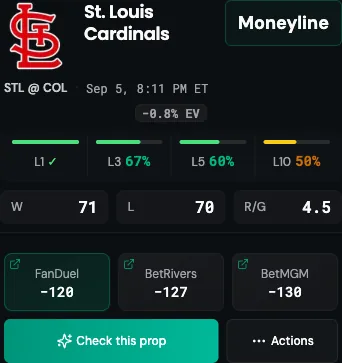
| Element | What it means |
|---|---|
| Subject | The player or team, with logo |
| Market | The market and line, such as Over 1.5 Hits or Moneyline |
| Matchup and time | Which game and when it starts |
| EV read | Expected value at the tracked price, positive or negative |
| Hit-rate chips | L1, L3, L5, L10 (recent results with counts and percentages) |
| Season stats | Context relevant to the market, like W-L and runs per game |
| All-book prices | Books currently offering it, best price first, linking out |
| Check this prop | Opens the full Bet Check evidence view |
| Actions | Additional actions including Track Bet |
Hover states and tooltips give the exact counts behind each hit-rate chip, like "Hit 3 of last 5 games" rather than just "60%".
Reading hit rates without fooling yourself
The chips are the most eye-catching thing on the card and the easiest to misuse.
Counts beat percentages. "L3 100%" is 3 for 3. That's three games, not a pattern. "L10 80%" is 8 of 10, which is at least a sample you can reason about.
A 100% L3 with a bad L10 is a hot streak, not an edge. Streaks regress. If the shorter window looks great and the longer one doesn't, you're usually looking at noise.
Recent form isn't the same as a matchup. Hit rates don't know who's pitching tonight or which corner is covering.
Hit rate ignores price. A prop hitting 70% at −250 is a losing bet. Break-even at −250 is 71.4%. Always read the hit rate against what you're paying, which is what the EV read is for.
Prices, and why they're on every card
Every card lists the books offering that market with their prices. Take the best number you can actually bet.
Prices are captured snapshots and can move, especially near game time. Click through to confirm before you fire. The sportsbook prices and line shopping guide covers why a few cents matters more than most bettors think.
A workflow that gets you to a decision
- Pick a chip. +EV Only or Player Props, depending on what you're hunting.
- Filter to your books. Stop looking at prices you can't take.
- Narrow to markets you understand. Betting a market you can't reason about is how the board wins.
- Set an odds range under More so you're not scrolling past heavy chalk or lottery tickets.
- Sort by EV.
- Take the top few and Check them. Read the actual evidence before you decide.
- Track what you bet, at the price you got.
Six filters and three Checks beats scrolling two hundred cards.
When the board is empty
- In season, filters too tight — hit Reset.
- Books haven't posted — player props often arrive later than game markets.
- Out of season — see the sports and markets coverage guide.
- No fresh prices — the board won't show stale numbers as if they were current.
The empty state usually names the reason. Read it first.
Where to go next
- Bet Check user guide — the evidence view behind every card
- My Bets and bet tracking guide — record what you bet
- WagerLens confidence score explained
- Sports and markets coverage guide
Last reviewed: September 5, 2026 · Owner: Brian McAbee
See it live before you bet
Player props with best prices, hit rates with sample sizes, and a public track record.
- Every pick graded — wins and losses, no filters
- Hit rates for the exact line and recent windows
- Sportsbook price comparison on free Bet Checks
- Premium adds tracking, history and stats, and alerts
- Public track record with wins and losses