
My Bets user guide: tracking, units, and your real record
Ask a bettor how they did last month and you'll get a story. Ask for the number and it usually doesn't exist, or it lives in a spreadsheet nobody's updated since June.
The problem isn't discipline. It's that logging a bet by hand means writing down the market, the line, the book, the price, the stake, and the date. Six fields, on a phone, while the game is starting. Nobody does that consistently.
My Bets removes the typing. You track a bet from the prop card you were already looking at, WagerLens locks in the exact quote you took, and the bet settles itself when the game finishes.
Who can use it
Bet tracking requires an active Premium subscription, which includes the 5-day free trial every new account starts on. If your subscription isn't active, the Track Bet dialog will tell you. Everything else in this guide assumes Premium.
What "tracked at the quote" means
This is the part that makes the record trustworthy, so it's worth being precise.
When you track a bet, WagerLens pulls the current sportsbook offers for that exact market and asks you to pick one. The book, the market, the line, and the price all come from that quote. You don't type them, and they stay fixed afterward. The dialog says it directly: market details are locked to the sportsbook quote.
That means your record reflects the price you actually got, not the price you remember getting or the closing number. It also means there's a hard requirement: you can only track a bet while a live quote exists.
If the game has already started or the books have pulled the market, you'll see this:
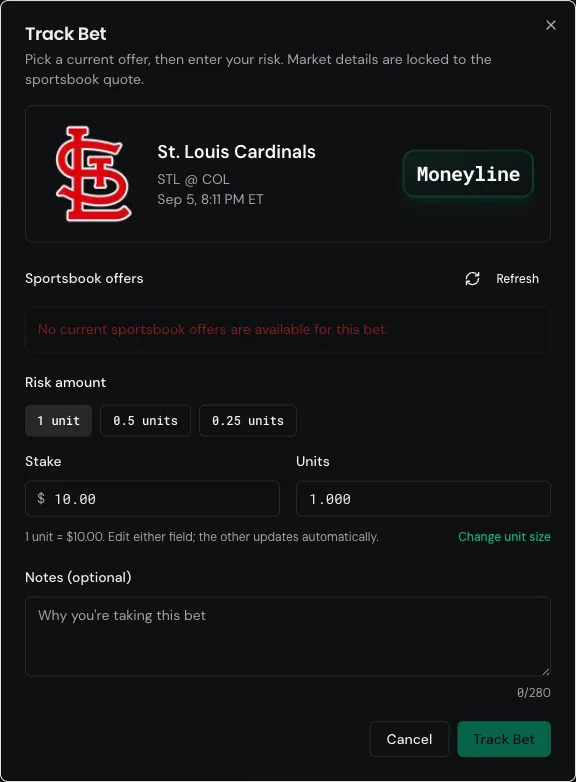
There's a Refresh button in the dialog if you think the quote just lapsed. If offers genuinely aren't available, the bet can't be tracked. That's a deliberate tradeoff: a record built only from verified quotes is worth more than a complete record built partly from guesses.
Tracking a bet
From any eligible prop card, whether on the props board, the dashboard, or Picks, open Actions and choose Track Bet.
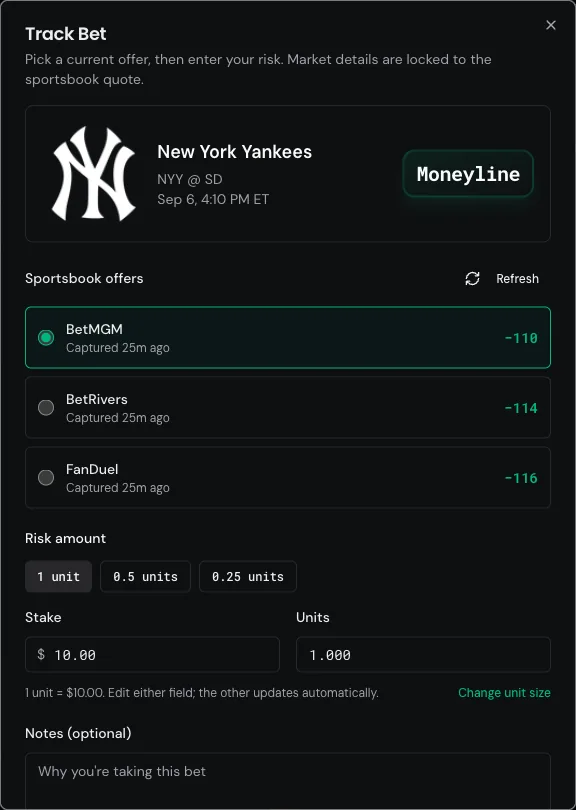
Three things to set:
1. Pick the offer
Each book shows its price and how long ago the quote was captured. Take the best number you can actually bet. If BetMGM is −110 and FanDuel is −116, and you have both apps, that's a free 6 cents.
2. Set your risk
Enter it in dollars or units. Edit either field and the other updates. Quick buttons cover 1 unit, 0.5 units, and 0.25 units.
Your unit size is a single saved setting. The dialog shows the conversion inline ("1 unit = $10.00"), and Change unit size updates it. If you haven't set one yet, you'll be asked to before your first tracked bet.
Units matter more than dollars here. A $50 bettor and a $500 bettor with identical process have identical unit results and wildly different dollar results. Units are how you compare yourself to yourself over time.
3. Add a note (optional)
280 characters, prompted with "Why you're taking this bet."
Use it. Six weeks from now, "took the stale −110 before the line moved" is the difference between a data point and a lesson. This is the single highest-value field in the whole flow and it's the one people skip.
Your record
The My Bets page opens with a summary strip.

| Metric | What it means |
|---|---|
| Total bets | Everything you've tracked |
| Open | Tracked but not yet settled |
| W-L-P | Wins, losses, pushes |
| Total staked | Dollars risked across settled and open bets |
| Net profit | Dollars won or lost |
| ROI | Net profit as a percentage of total staked |
| Units P/L | The same result in units, independent of your bet sizing |
Below it, every bet in a table with the subject, matchup, market, book, price, risk in dollars and units, result, profit, and when you tracked it.
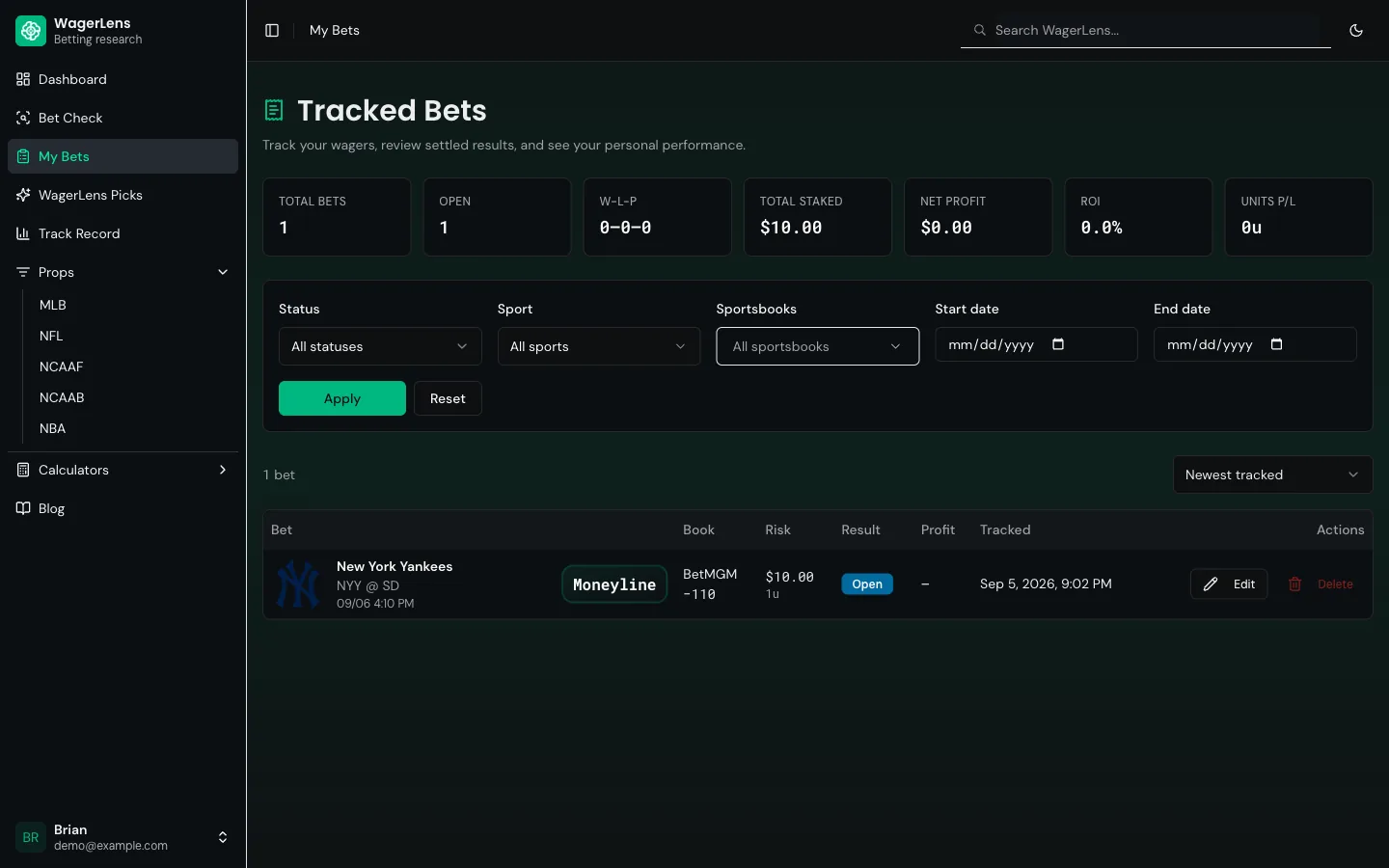
Filter by status, sport, sportsbook, and date range, then sort. The obvious cuts are the useful ones: your record on one book, your record on one sport, your record since you changed something about your process.
Settlement happens on its own
WagerLens grades your bets for you. When the underlying game finishes and the market resolves, it settles the tracked bets attached to that market and updates your record. Wins, losses, pushes, and voids are all handled.
Voids and pushes are excluded from win rate but still show in your history, which is the correct treatment. A push isn't a win, and pretending otherwise inflates your number.
If a game finishes and your bet is still showing open, give it time. Resolution runs after the market settles, not at the final whistle.
Editing and deleting
Edit is available on open bets, and it's intentionally narrow.
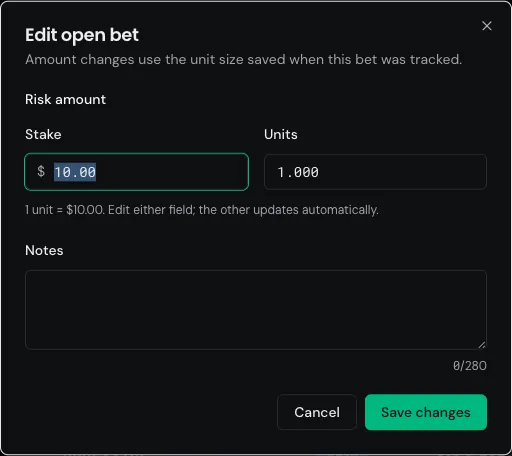
You can change your stake and your notes. The market, line, book, and price stay locked to the original quote. Amount changes use the unit size that was saved when you tracked the bet, so historical units don't silently shift when you resize your bankroll.
Delete removes a bet from your record entirely. Use it for genuine mistakes, like a bet you tracked but never actually placed. Deleting losers is a great way to build a record that lies to you.
What this record actually measures
It's a record of the bets you chose to track. That's it.
If you track your confident plays and skip the late-night ones you're not proud of, your ROI is fiction. The tool records honestly; it can't make you log honestly. The value only shows up if you track everything or nothing.
It's also separate from the public WagerLens track record. That page shows how our published recommendations performed. My Bets shows how you performed. Two different ledgers, and they'll rarely match, because you pick which recommendations to bet and you'll bet plenty of things we never published.
Sample size applies to you too. Forty bets is a weekend's worth of variance, not evidence that your process works. Give it a season before you draw conclusions.
A reasonable routine
- Track every bet at the moment you place it, while the quote is live.
- Write one sentence in the notes about why.
- Don't look at ROI for a month.
- Then filter by sport and by book and see where the damage actually is.
- Change one thing. Give it another month.
That's it. The tool isn't clever. It's just honest, and honest beats clever over a season.
Where to go next
- Bet Check user guide — check the evidence before you track it
- Props screen user guide — where most trackable bets come from
- WagerLens Picks guide — our published recommendations
- Public track record guide — how our results are calculated
- Open My Bets
Last reviewed: September 5, 2026 · Owner: Brian McAbee
See it live before you bet
Use settled results to keep your betting process honest.
- Every pick graded — wins and losses, no filters
- Hit rates for the exact line and recent windows
- Sportsbook price comparison on free Bet Checks
- Premium adds tracking, history and stats, and alerts
- Public track record with wins and losses