
Bet Check user guide: type a bet, see the evidence
Most bet research dies the same way. You've got a bet in your head, you open three tabs to check the player's recent games, you forget which book had the best number, and twenty minutes later you place it anyway because you already decided.
Bet Check collapses that into one step. You type the bet. WagerLens figures out what you meant, pulls the numbers that actually apply to it, and shows you every book's current price. It won't tell you to bet it. That part's still yours.
What Bet Check does
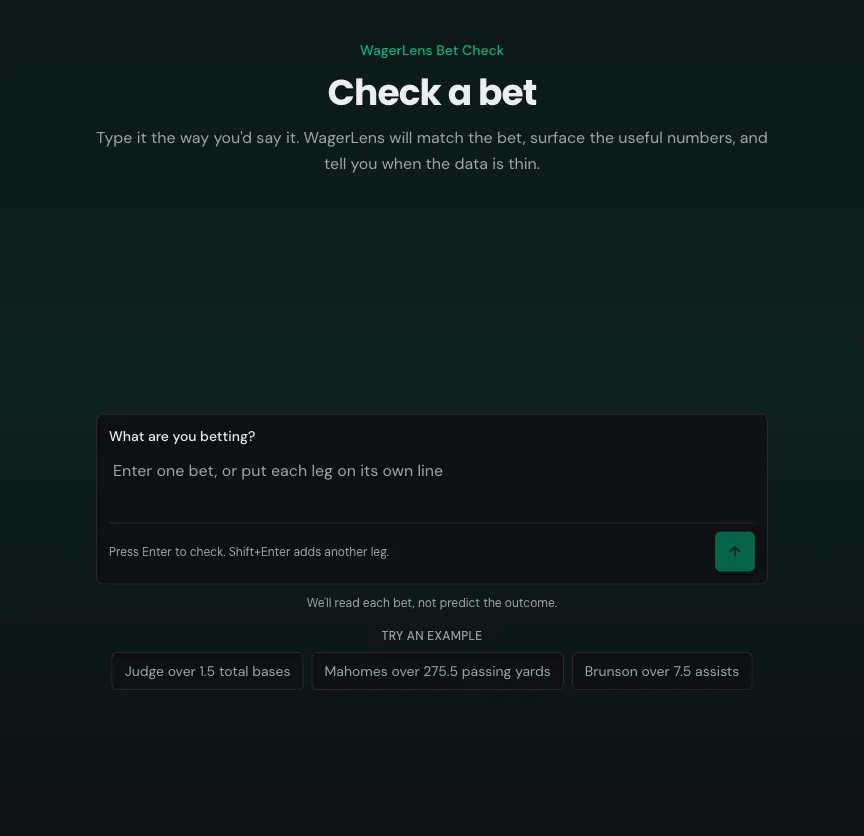
Bet Check reads a bet written in plain language, matches it to a real market on the board, and shows you the supporting data.
It answers four questions:
- Did I read this right? It restates the bet it matched, so you can catch a bad match immediately.
- What has actually happened recently? Hit rates, records, and averages over recent games.
- What am I paying? Where prices are available, every book's current price on that exact market, with implied break-even rates.
- What don't we know? Thin samples, stale quotes, and missing data get called out instead of glossed over.
Bet Check stops at the evidence. The result page states its own scope in plain terms: verified facts only, no score or recommendation. You get the facts. The call is yours.
Who can use it
Bet Check is free and doesn't need an account. Type a bet at wagerlens.com/check and you'll see the match, the sample, the line and the price. Checks are private to this browser and saved for 7 days.
Some of the places Bet Check links you afterward, like the full props board and WagerLens Picks, need a Premium subscription.
There's a short-term limit of 10 checks per minute to keep the service fast for everyone. Normal use won't hit it. If you do, wait a few seconds and try again.
Supported input
Bet Check reads plain text. Type it how you'd say it to a friend:
Team moneyline vs opponentYankees vs Red Sox game totalYankees game totalorYankees vs Red Sox spreadPlayer over 1.5 total basesPlayer over 29.5 receiving yards
Player name and market are enough. Add the opponent, the line, or the book when you want to pin down a specific bet, and skip them when you don't.
If you ask for a game total or spread without picking a side, Bet Check shows the game's main posted line and nearby lines. Both sides are shown; choose one to open its research. The main line is the most common line posted with both sides at the same tracked books, not a line guaranteed at every book. If no books currently share a line, you'll see the posted sides without a consensus. Bet Check names the books posting both sides; the best price shown for each side may come from different books. Quotes show their book and update time. A team total is a different market: say Yankees team total when you mean only the Yankees' runs. If more than one game fits a team-only query, Bet Check asks which game, not which side. An explicit bet like Yankees vs Red Sox over 8.5 game total still goes straight to the check for that side.
If all quotes are old, you can still open the research for a last-tracked line. Bet Check labels those lines as historical, shows when each side was last seen, and does not show a current price or consensus. Confirm the actual line and price at your book before making a decision.
On desktop, you may also see Try an example chips below the composer when today's board has matchable player props. Treat them as shortcuts, not permanent picks. They rotate with the slate and hide when no current example qualifies.
For a multi-leg slip, the cleanest input is one leg per line. Shift+Enter adds a line, Enter submits. Semicolons and numbered lists (1., 2.) split the same way, and each leg comes back as its own result card.
Joining legs with and works too. Bet Check shows you the split it found, lists the bets it pulled out, and waits for you to confirm before running them. If it can't tell where one bet ends and the next starts, it says so and asks you to put each bet on its own line.
Bet Check matches against supported text-check markets in MLB, NFL, NBA, and NCAAB. The sports and markets coverage guide is the reference for what it can find. NCAAF game lines can appear on the board, but Bet Check does not support NCAAF yet. When a bet falls outside its scope, it says so rather than guessing.
Reading the result
Here's a real check on a Yankees moneyline.
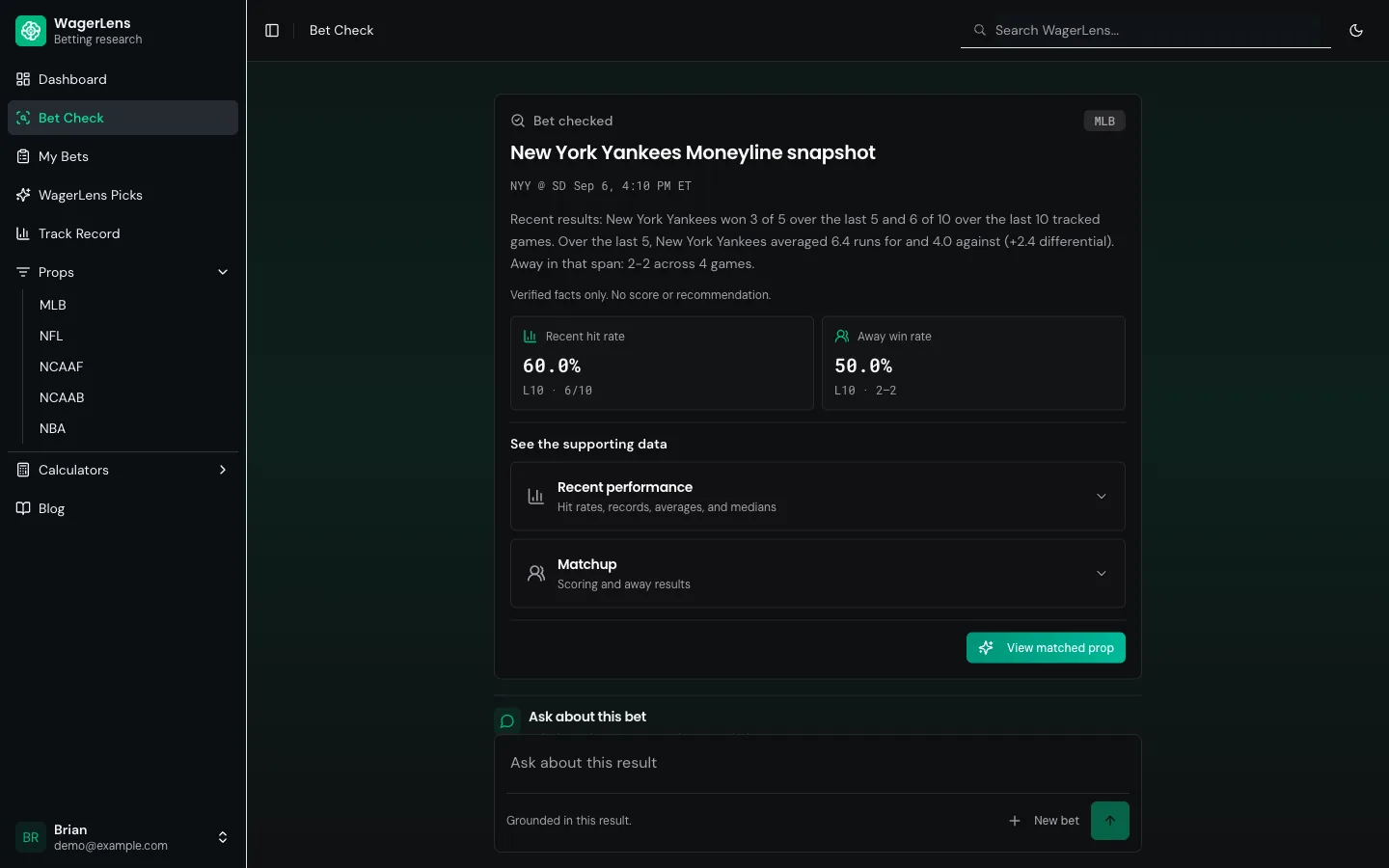
Work down the page in this order.
1. The matched bet
Top of the card shows the sport, the subject, the restated bet, the matchup, and the start time. Read this line first. If you typed a common surname and WagerLens matched the wrong guy, you'll catch it here in two seconds rather than after you've read the whole page.
2. The data-quality wording
This is the part most tools hide. When the data behind the numbers is thin, stale, or partly unavailable, Bet Check says that plainly instead of inventing confidence. You may see "Not enough trusted data." when the evidence is not strong enough to build a result, or "We matched the bet." when WagerLens found the market but could not build a complete trend packet. It is not a judgment on the bet. It's a warning about the evidence.
If a player prop has no active line, Bet Check won't silently swap in a different bet. When another priced market is available for that same player, you can choose it and run a separate check. MLB injury notes appear only when the source report is recent; an absent note does not mean the player is healthy. Where lineup status is available, its source and observation time appear beside it.
3. The snapshot
A short factual paragraph: recent record, scoring averages, home/away splits. No adjectives, no lean. When inputs are missing or stale, Bet Check keeps those limits separate in the supporting data and follow-up answers instead of pretending the sample is complete.
Saved checks stay private unless you choose Share result on a completed selection. That makes a separate public snapshot with the matched selection, tracked price, sample and timestamps. Your typed question, follow-ups, and account details stay private. The link remains a dated historical snapshot after the game, not a live check. Use Stop sharing or delete the private check to take its public snapshot down. If the private check has expired, open the public link in the same account or browser to remove it.
4. The metric tiles
Two to four headline numbers with their sample size attached. "60.0% — L10 · 6/10" tells you both the rate and how many games produced it. A 60% hit rate over 10 games and a 60% hit rate over 100 games are different animals, so the denominator is always shown.
Where a price tile appears, quote freshness uses labels like Live, Aging, or Check book so you know when to confirm the number at the sportsbook.
Digging into the evidence
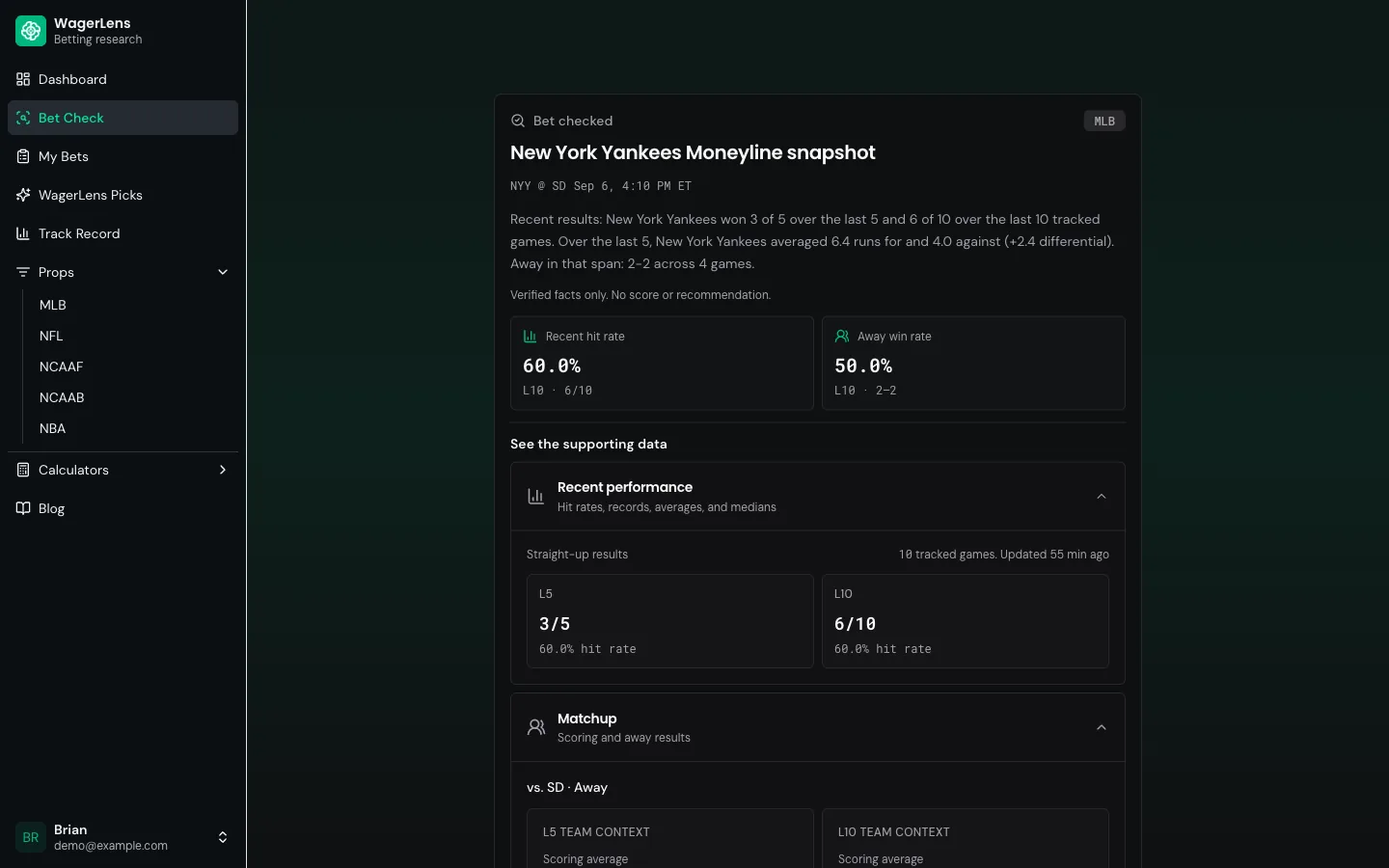
Under See the supporting data there are collapsible sections. Which ones appear depends on the bet and on what data we actually hold for it, so don't be surprised when a thin market shows fewer. Open them when a headline number surprises you.
| Section | What's inside |
|---|---|
| Recent performance | Straight-up results with hit rates over the last 5 and last 10 tracked games, plus how long ago the data was updated |
| Matchup | Scoring for and against, run/point differential, and home or away record over L5 and L10 |
| Odds | Every book currently offering this market, its price, the implied break-even rate, and how fresh the quote is |
The Odds section is doing more work than it looks. Three books at −110, −114, and −116 on the same market is a 1.3-point spread in break-even rate. That gap is small on one bet and enormous over a season. More on that in the sportsbook prices and line shopping guide.
One thing worth internalizing: the implied percentages next to each price are break-even rates, not WagerLens win probabilities. −110 implies 52.4%, which means you need to win 52.4% of those bets to break even. It is not a claim that this bet wins 52.4% of the time.
Asking follow-up questions
Below the evidence there's an Ask about this bet box with suggested prompts:
- Why does this look this way?
- Show me the recent form.
- What price are you using?
- What data is missing?
- How fresh is this?
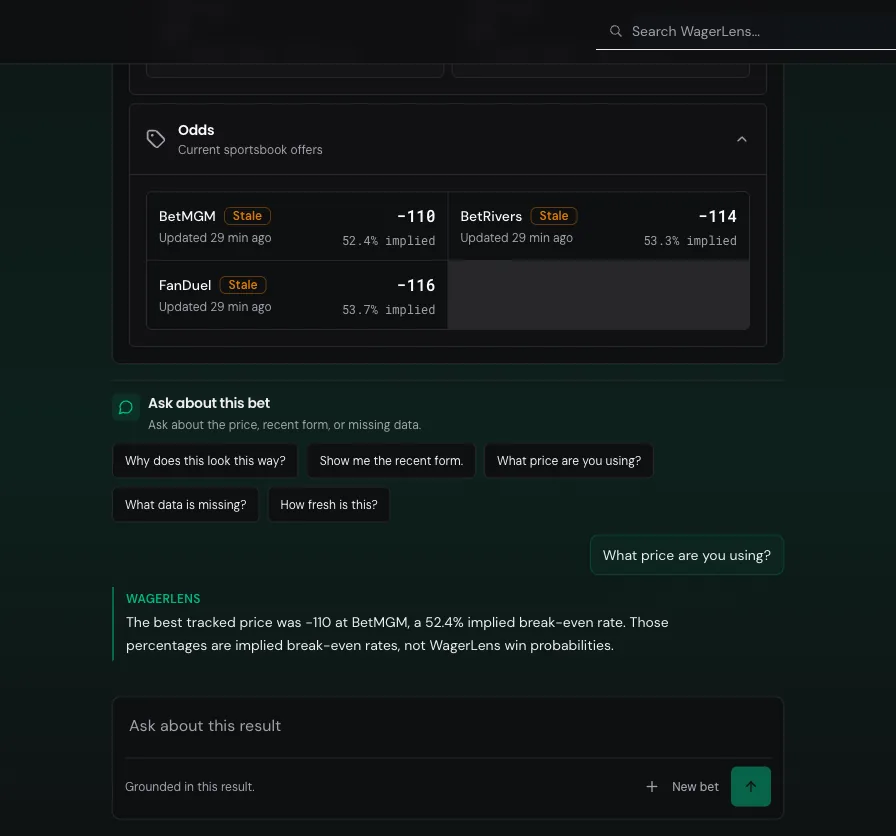
Answers are grounded in the result you're looking at. The panel says so: "Grounded in this result." Ask it about the price and it quotes the prices it actually pulled. Ask it what's missing and it names the gaps. It won't wander off and invent a narrative about locker room chemistry.
A workflow that actually works
- Check the bet you were already going to make. Not a hypothetical. The one in your slip.
- Read the restated bet. Confirm it matched what you meant.
- Look at the sample size before the percentage. 8/10 over ten games beats 3/3 over three.
- Open the Odds section, when it's there, and take the best number. If your book is 6 cents worse, that's a real cost.
- Ask "what data is missing?" once. It's the fastest way to find the hole in your own reasoning.
- Decide. Then, if you're Premium, track it so you can review the decision later instead of relying on memory.
Limitations
Bet Check is built to keep the answer grounded in data WagerLens can verify. That means it will sometimes say less than you want, especially for thin markets, stale prices, or bets outside the live board.
The boundaries are intentional:
- Supported sports. Text checks currently cover MLB, NFL, NBA, and NCAAB. NCAAF game lines can still appear elsewhere in WagerLens, but Bet Check does not parse NCAAF yet.
- Text only. Screenshot and bet-slip image input has not shipped, so paste or type the bet.
- Input size. A check can include up to 20 legs, 500 characters per leg, and 4,000 characters total.
- Independent legs. Parlays are split into legs, then each leg is checked on its own. Bet Check does not price the parlay, calculate combined odds, or judge same-game correlation.
- Live-board matching. Bet Check only matches markets WagerLens currently has on the board. If the player, team, or game is outside the live window, the check won't have a match.
- Follow-ups. Follow-up questions work only after one complete single-leg result. They are matched to supported intents, not free-form chat, and typed questions stop at 240 characters.
- Request deadline. Each check has about 20 seconds to finish. Long slips, slow matching, or upstream delays can time out.
- Price percentages. Implied percentages are the break-even rate baked into a sportsbook price. They are not WagerLens win probabilities.
- Calculation depth. Some canonical markets have market-specific deterministic trend calculations. The rest can return matched facts when available, without a rating.
- No verdicts. Bet Check never returns a score, pick, or recommendation. That's a product choice: the tool shows the evidence, and you decide whether the bet still makes sense.
Troubleshooting
We couldn't read that bet.
- Rewrite the bet as one plain sentence with the player or team, market, side, and line.
- Remove payout math, stake size, promo text, and extra sportsbook slip language before trying again.
That input could not be identified as a sports bet.
- Start with the actual wager, like
Player over 1.5 total bases, not notes about why you like it. - Check spelling and avoid nicknames that don't appear on the board.
I couldn't separate these bets.
- Put each leg on its own line, then submit again.
- Avoid long
andchains for parlays. Numbered lists and semicolons are easier for Bet Check to split.
We couldn't match that bet.
- Add the sport, opponent, or team abbreviation if the name is common.
- If the game is not in the current board window, wait until closer to game time and check again.
We couldn't match this bet.
- Edit that leg only. The rest of a multi-leg check can stay as-is.
- Add the full player name, team, opponent, or market if the short version was too vague.
That market isn't supported yet.
- Switch to a market listed in the sports and markets coverage guide.
- If you're checking NCAAF or a player prop WagerLens doesn't carry, Bet Check will not invent a replacement market.
This check ran out of time. Try again.
- Retry once, especially if the slip is short and the wording is clear.
- If it happens on a long parlay, cut the slip into smaller groups and run them separately.
Not enough trusted data.
- Treat the result as incomplete, not as a lean against the bet.
- Try again closer to game time, when prices, lineups, or recent-form data may have refreshed.
One detail needs a closer look
- Pick the candidate that matches your bet before WagerLens runs the check.
- If none of the candidates are right, edit the bet with the full player name, team, opponent, or market.
The tracked sportsbook price was marked stale.
- Run a new check if you need the freshest WagerLens snapshot.
- Confirm the number in your sportsbook before betting. A stale tracked price can be different from the line you can actually place.
Frequently asked questions
Do I need an account to check a bet?
No. Bet Check is free and works without an account.
Is Bet Check free, or do I need Premium?
Bet Check is free. Premium adds price comparison across every book, the full props board and research depth.
Why won't it give me a pick?
Bet Check is for research, not tailing. It shows the match, recent evidence, sample size, price context, and missing data, but it does not tell you what to bet.
Why does it say "Not enough trusted data."?
It means WagerLens understood the bet, but the trusted evidence is too thin or incomplete to build a full result. If the market was found but the trend packet could not be completed, the card may say "We matched the bet." Either way, read the sample size, missing data, and price freshness before deciding how much weight the result deserves.
Which sports and markets can I check?
Bet Check supports MLB, NFL, NBA, and NCAAB text checks. For the current sport-by-sport market list, use the sports and markets coverage guide instead of guessing from one example.
Can I check a parlay?
Yes, up to 20 legs. Put one leg per line for the cleanest split, and remember that WagerLens checks each leg independently rather than pricing the whole parlay.
Is WagerLens a sportsbook or a capper?
No. WagerLens does not take bets, book action, or sell guaranteed picks. It's a research tool for checking the evidence before you decide.
Can WagerLens guarantee a bet will win?
No. Hit rates, prices, and matchup data describe what has happened and what the market is charging. They can't guarantee the next result.
Where your judgment comes in
Bet Check reports what's in the data, honestly, including the parts that are missing. What it can't see is everything that hasn't reached the data yet: the injury that happened during warmups, the weather at first pitch, the manager quietly resting a starter. That's your half of the job.
The bettor stays the decision-maker. WagerLens gives you the reason to question a bet, not permission to place it.
Where to go next
- My Bets and bet tracking guide — record the bet and grade your own process over time
- WagerLens Picks guide — how our published recommendations differ from a Check
- Sportsbook prices and line shopping guide — why the Odds section matters more than the hit rate
- Sports and markets coverage guide — what's supported, by sport
- Check a bet now
Last reviewed: September 5, 2026 · Owner: Brian McAbee
See it live before you bet
Type a bet and see the evidence behind it.
- Every pick graded — wins and losses, no filters
- Hit rates for the exact line and recent windows
- Sportsbook price comparison on free Bet Checks
- Premium adds tracking, history and stats, and alerts
- Public track record with wins and losses